Supporter Features
Unmanic is free and open source, and standard development continues for everyone.
Supporter access helps fund infrastructure and ongoing work, and it unlocks additional capabilities in Unmanic.
What Supporter Access Unlocks
Supporters unlock:
- Unlimited libraries
- Unlimited linked installations
- Advanced plugin options
- Unmanic Central features
- Supporter community benefits and channels
Ways To Gain Supporter Access
You can gain supporter access through one of the following:
1. Financial Support
- Monthly donations through Patreon or GitHub Sponsors
- Patreon donations from the minimum tier upward count toward supporter status
- GitHub Sponsors can be monthly donations or one-off donations
- If your total donations reach $36 US over the course of your support, you are granted permanent lifetime supporter status
If your total donations have reached at least $36 US, permanent lifetime supporter status is applied automatically.
2. Development Contribution
Development contributions are recognized across official Unmanic repositories on GitHub.
This includes code contributions, plugin work, documentation fixes, bug investigations, testing support, and other meaningful improvements that help move the project forward.
Contributions do not need to be large; even small, useful improvements can be enough to qualify for supporter status.
3. Community Participation
Community participation is recognized through role assignments in the Unmanic Discord.
Roles may be granted for consistently helping others, sharing useful technical feedback, participating in testing of new features and bug fixes before release, contributing ideas that improve the project, or supporting plugin development and maintenance.
As with development contributions, consistent helpful participation matters more than size, and active contributors can receive supporter status through this role-based system.
Project Funding System
The Project Funding system lets the community prioritize optional features that take extra work, while regular development continues as normal.
Standard development work, bug fixes, and small quality improvements continue through the normal development flow and do not require funding.
Credit Conversion Tiers
Credits are calculated from monthly sponsorship using progressive conversion bands, plus a repeat-support bonus.
| Monthly Support | Base Rate | Example (Includes +20% Repeat-Support Bonus) |
|---|---|---|
| $1.00 - $4.99 / month | 5 credits per $1 | $2.00 = 10 base + 2 bonus = 12 total |
| $5.00 - $14.99 / month | 6 credits per $1 | $6.00 = 36 base + 7 bonus = 43 total |
| $15.00 - $34.99 / month | 7 credits per $1 | $15.00 = 105 base + 21 bonus = 126 total |
| $35.00 - $59.99 / month | 8 credits per $1 | $35.00 = 280 base + 56 bonus = 336 total |
| $60.00 - $99.99 / month | 9 credits per $1 | $60.00 = 540 base + 108 bonus = 648 total |
| $100.00+ / month | 10 credits per $1 | $100.00 = 1,000 base + 200 bonus = 1,200 total |
Support amounts below $1.00/month do not currently accrue credits.
Repeat-Support Bonus
If your sponsorship remains active month to month, your account receives a continuity bonus.
Current bonus: +20% of base monthly credits.
Proposal Cancellation
If a proposal is cancelled and removed from the funding list, credits previously assigned to it are returned to your balance in the next account update cycle.
Unlocking Features in Unmanic
To unlock supporter features in the Unmanic app, you need to sign in and link your Unmanic instance with a supported account.
Step-by-step login flow
- Open the left-hand navigation drawer in Unmanic.
- Click the Login button.
- In the login dialog, copy the code shown in Unmanic.
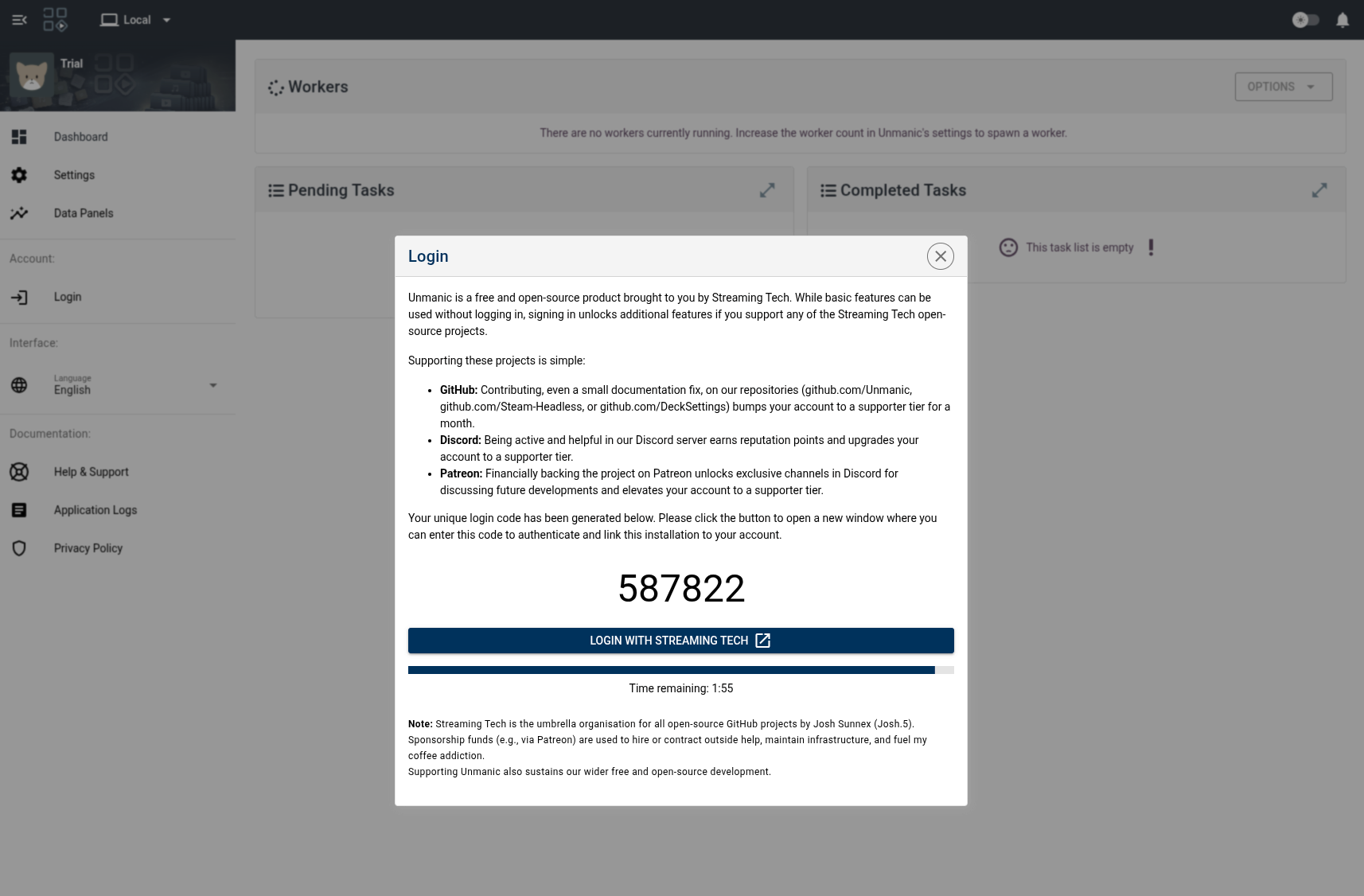
- Click Login with Streaming Tech.
- A new browser window opens. Sign in with Discord, Patreon, or GitHub.
- After signing in, paste the code from Unmanic into the Application Link Code field.
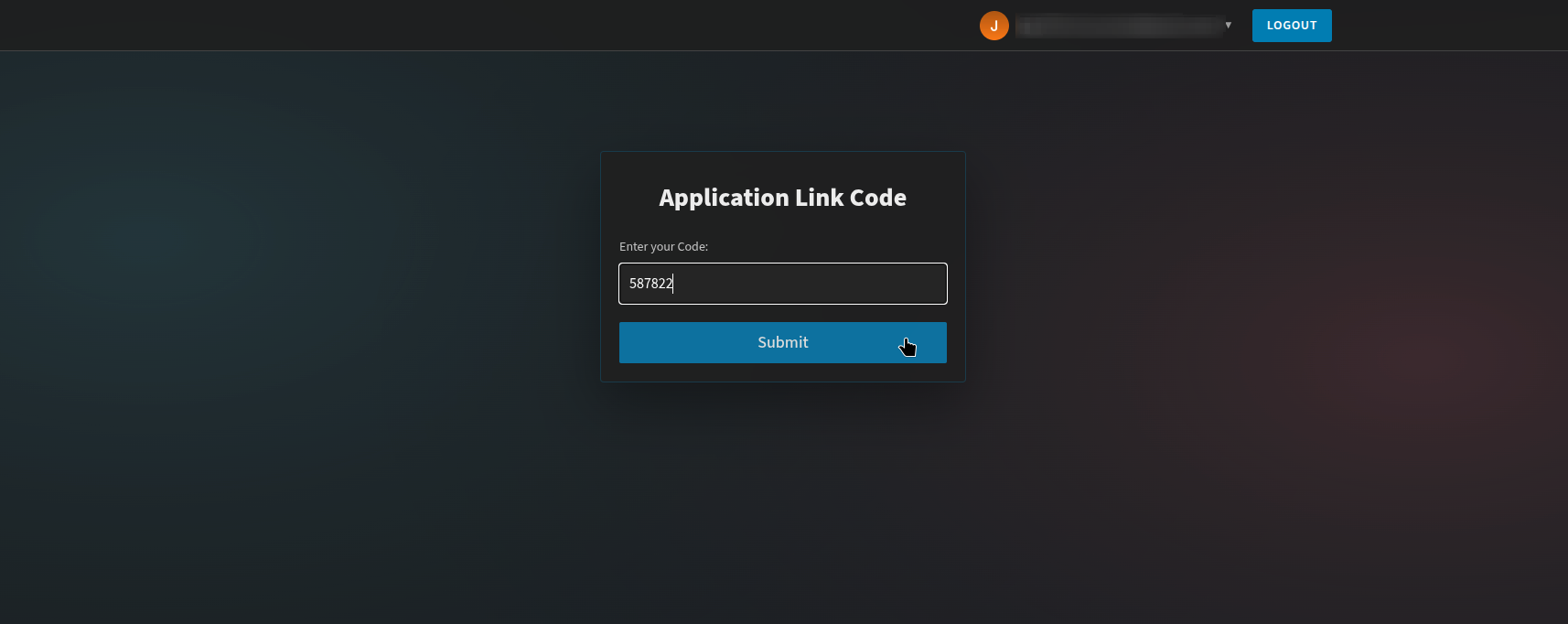
- Click Submit.
- Wait a few seconds. The dialog in Unmanic will close and your session will be logged in.
Important supporter-status requirement
Signing in only links your account. Supporter features are unlocked only if the account you signed in with has supporter status.
If you sign in with an account that does not have supporter status yet, you will still be logged in, but supporter-only features remain locked.
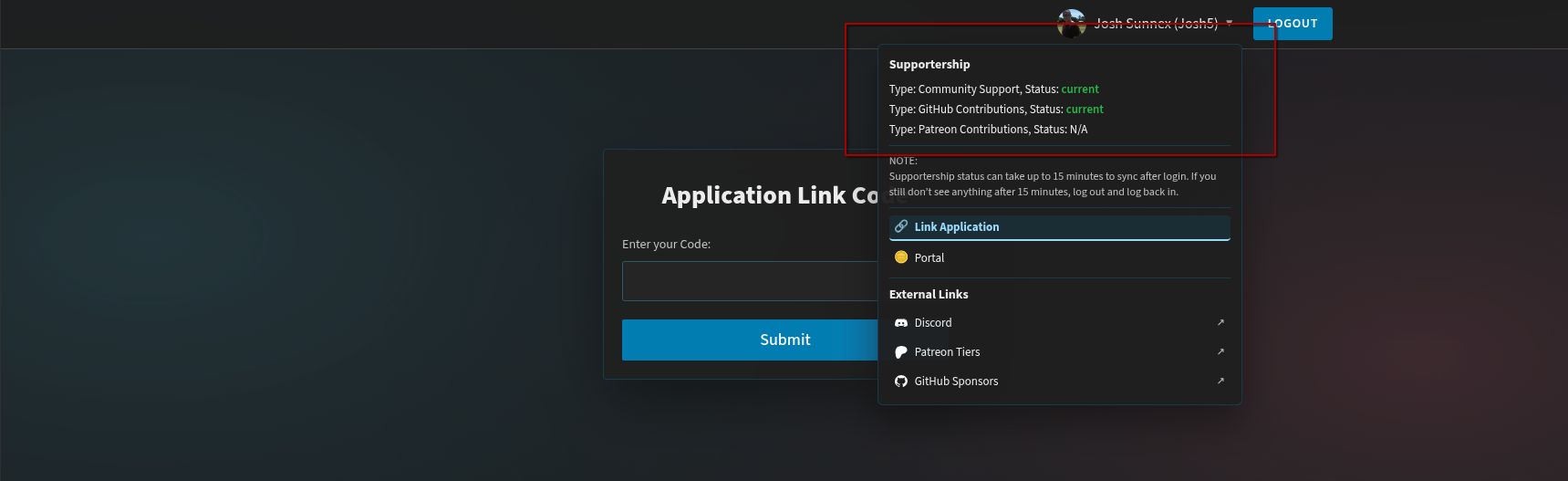
You can review your supportership status in the user dropdown of the Application Link Page.