Why use Unmanic?

Save File Space
Unmanic can allow you to free up petabytes of storage space

Set and Forget
Unmanic can run in the background, so you do not need to manually set tasks or actively monitor

Quick to Setup
Unmanic's basic features can be configured in under 2 minutes. For most people, this is all that is required.

Easy to Use
Unmanic has been designed to be simple to install and easy to use.

Multi-Tasking
Unmanic can manage multiple file conversion tasks at a time.

Extensions
Unmanic is fully extensible. You have the ability to write any Plugin to run any task.

Powerful for Advanced Users
Unmanic has been built with advanced features that allow more advanced users to dial in their library optimisation.

Opensource
Unlike most alternatives, Unmanic is the original project and is 100% open source under GPL v3.
Save File Space
Keep your library lean with automated file management.
Configure Unmanic to continuously optimize your library for storage. You define what “better compression” looks like, then Unmanic applies those rules across your files as new content arrives and old content is revisited.
Instead of occasional cleanups, your library stays space-efficient automatically.
It can reduce footprint in a few key ways:
- Remove bloat: strip unnecessary streams, attachments, or metadata you do not need
- Standardize outputs: keep formats and settings consistent across your library
- Compress media: use FFmpeg to shrink video (and audio) while preserving the tracks you want
- Convert and tidy files: turn documents into PDFs, normalize image metadata, and fix orientation
Extensible by Design
Start simple, then layer in plugins for every workflow.
Unmanic stays intentionally simple to operate. Set your targets, point it at a library, and it just keeps working. When you need more than the essentials, the plugin ecosystem lets you expand Unmanic into a full automation toolkit.
Install just a handful of plugins or mix many, many together to create the exact flow you need for your files. From format conversions to metadata cleanup, Unmanic makes it easy to automate the tasks that keep your library healthy.
Build your own workflow
Have a niche requirement? Writing a plugin is straightforward and well documented (Even an AI can write a fully functional plugin in under 10 mins). Start with the step-by-step guide in the documentation to build a plugin that fits your own pipeline.
Learn how to write a pluginPopular plugins
A few of the community favorites you can install right now:
- Standardize codecs, bitrate targets, and containers.
 Video Transcoder
 - Convert audio tracks to consistent formats and mixes.
 Audio Transcoder
 - Track savings and spot the biggest wins in your library.
 File Size Metrics
 - Detect and mark commercial breaks automatically.
 Comskip
 - Trigger library refreshes after processing finishes.
 Notify Plex (or Jellyfin)
 - Automatically rotate JPEG images based on Exif headers.
 Auto Rotate Images
 - Upscale videos using Dandere2x, Real-ESRGAN, or Waifu2x with Intel/AMD/NVIDIA GPU support.
 AI Video Upscaler
 - Rename files after processing using ffprobe metadata fields.
 Rename File
 - Normalize AAC audio streams and only process files with AAC tracks.
 Normalise AAC Audio Streams
 - Set the default audio track by language or Radarr/Sonarr original language.
 Re-order Audio Streams by Language
 - Execute an external script (Python, Node, or Bash) against a file.
 External Script
 - Strip specified audio and subtitle languages from video files.
 Remove Audio/Subtitle Streams by Language
Linked Installations
Share workers across PCs to keep one unified queue moving.
One queue, many machines
Link multiple Unmanic installations and let them share workers across your PCs. A primary installation coordinates tasks, then hands them off to connected machines that are enabled to receive work and have a matching library name.
You keep the same simple workflow, but now your fleet acts like a single, elastic worker pool. Add another PC and watch the queue clear faster without changing how you manage jobs.
Selective routing, your rules
Tasks only flow to linked installations that are configured to receive them, and only when a matching library exists. Create matching libraries only where you want tasks to run, and keep other installations out of that workload entirely.
Configure each installation with its own plugin stack for the same library name, then let linked tasks run on the hardware that fits. Set a distributed worker target to keep the overall worker count balanced.Learn how linked routing works
Scale on demand
Add or remove installations without reconfiguring the main queue.
Selective task sharing
Only installations with the matching library name receive tasks for that library.
Hardware-specific stacks
Tune plugins per installation to target NVIDIA, Intel, or Apple hardware.


Unmanic Central
Your entire Unmanic fleet, unified in one secure dashboard.
Unify your fleet
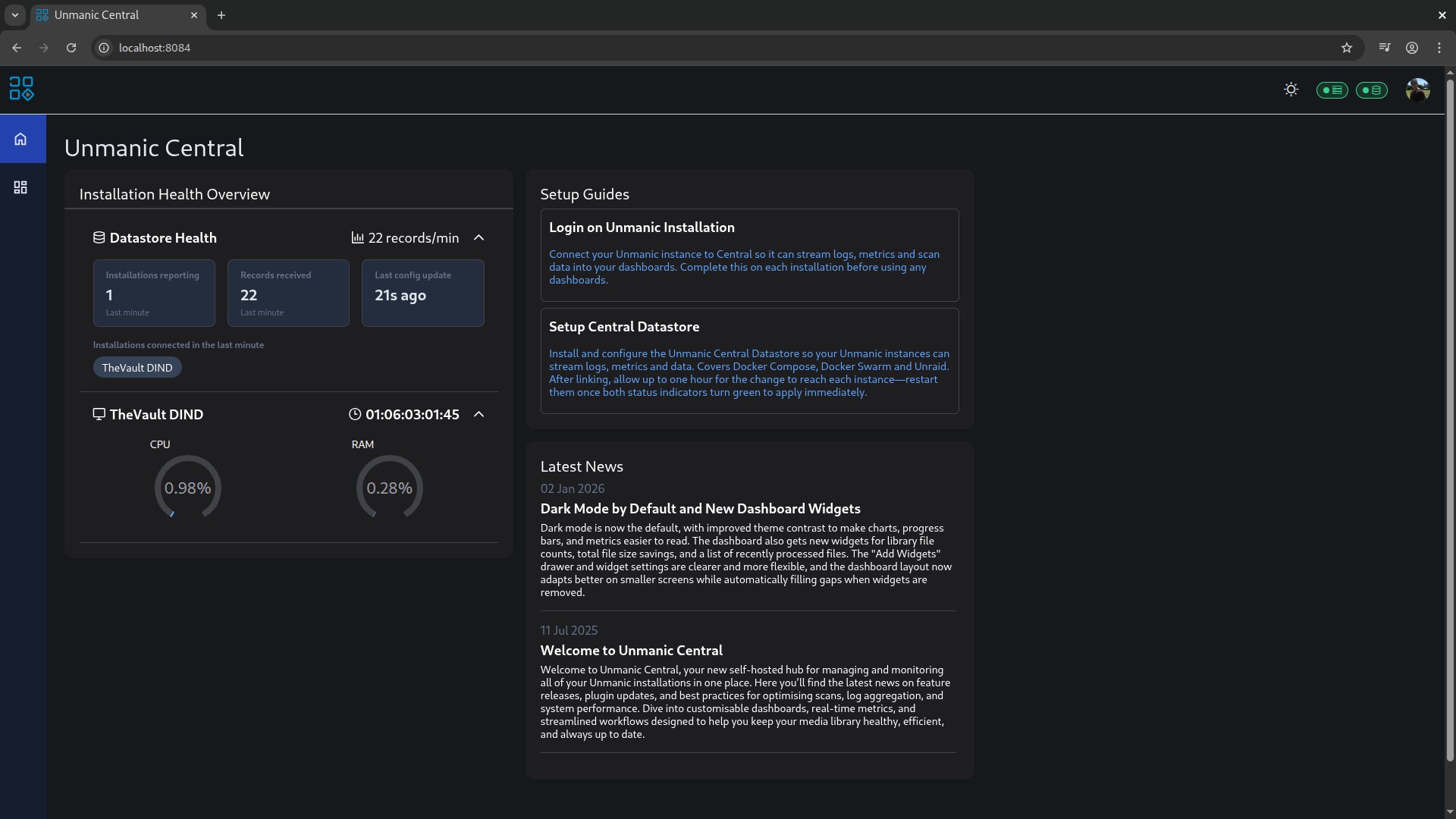
Unmanic Central brings multiple Unmanic installations together into one place, so your whole fleet feels like a single system. It collects metrics and logs into the Unmanic Central Datastore, a self-hosted service you run and control, so your data stays on your infrastructure.
Keep everything local-only on your LAN, or securely expose it to the internet behind your own reverse proxy with SSL (for example, Nginx Proxy Manager). If you want deeper reporting, you can connect Grafana directly to your datastore and build your own dashboards on the same data.
Build the dashboard you want
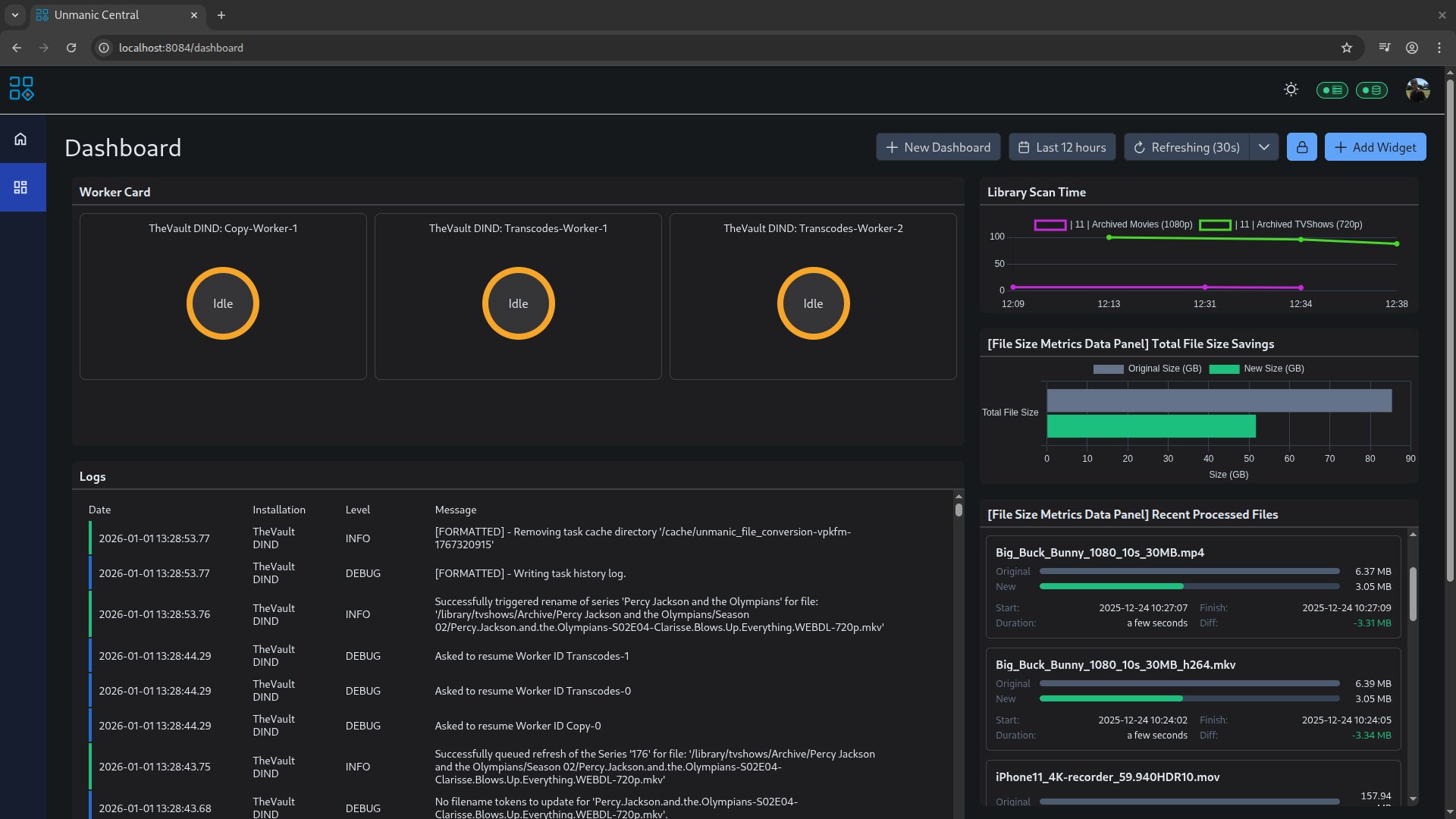
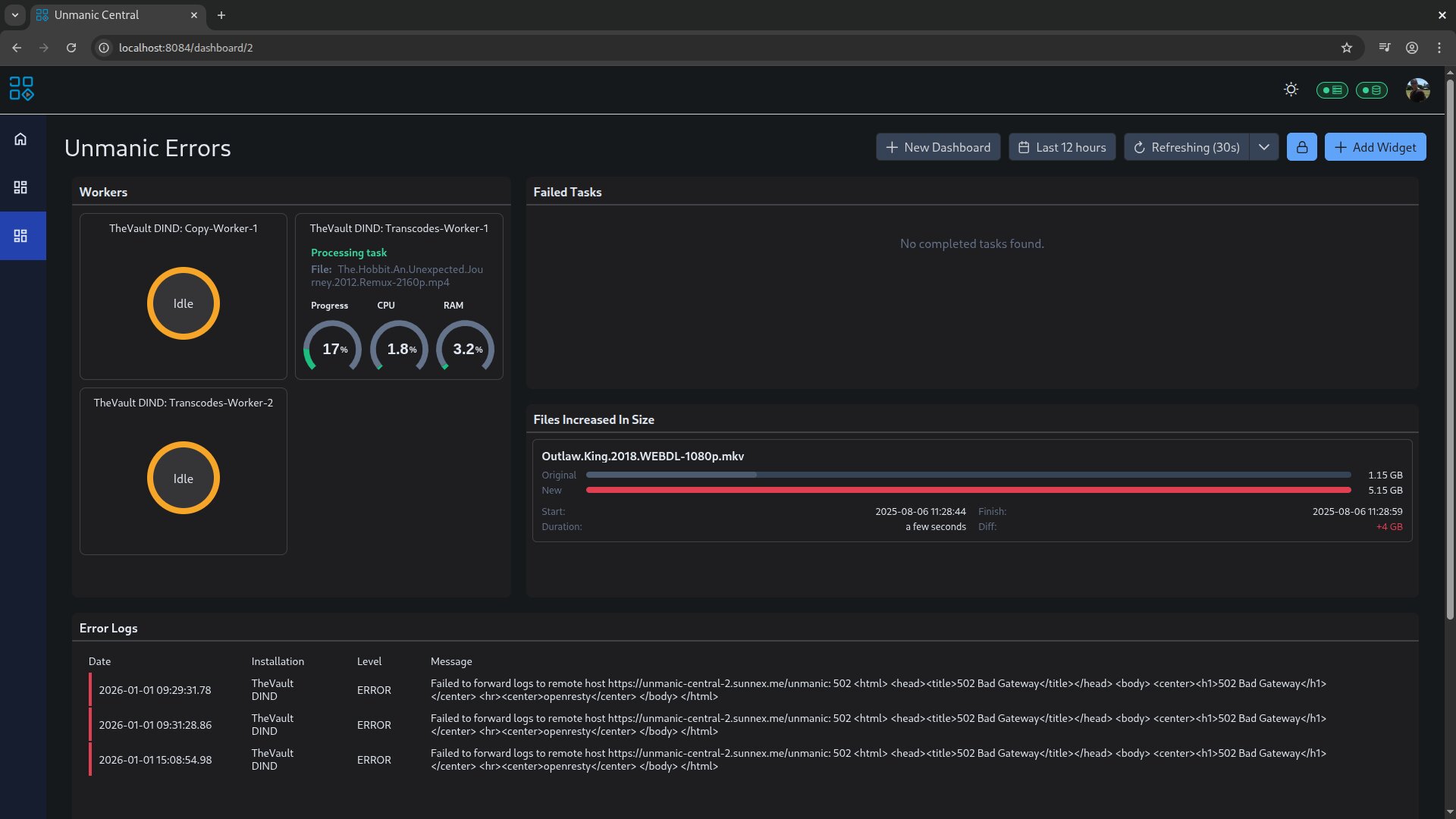
Unmanic Central isn't just a viewer. It's a dashboard builder. Create custom dashboards made up of widgets that surface what matters to you, across every installation: worker status and activity, resource usage (CPU/RAM), uptime, library size and scan history, and a timeline of recent events.
You also get a central place to triage issues fast: view logs from all installations in one stream, filter by installation name, focus on error-only output, and build dashboards that highlight failed tasks and current errors. For processing insights, track file-size metrics and total savings, then slice it by time range (last day/week, or custom dates) and by outcome (only increases, only decreases, or recently processed). For wall displays, enable kiosk mode with automatic refresh (for example, every 30 seconds).
Unmanic Central is available to supporters of the Unmanic project.
Feature Comparison
See what is included for everyone and what supporters unlock.
Unmanic is free and open source. Supporting it simply means helping ensure the future of the project, and no contribution is too small. You can unlock supporter features by helping out in a few easy ways:
GitHub
Log in with GitHub to link your profile.
Any commit to a project on Unmanic GitHub Org, even a small documentation fix, can bump your login to a supporter tier.
Alternatively, you can support through GitHub Sponsors. You can choose to provide a small monthly donation or a one-off donation. If your total donations reach $36 US over the course of your support, you are granted permanent lifetime supporter status.
Discord
Log in with Discord to link your profile.
Supporter status on Discord is role-based and can be granted for helpful community participation, testing and feedback, project contributions, or plugin development activity. Join the Unmanic Discord.
Patreon
Log in with Patreon to link your profile.
Any Patreon supporter tier unlocks supporter status. If your total donations reach $36 US over the course of your support, you are granted permanent lifetime supporter status.
Support via Patreon.
Support the project with a monthly contribution or unlock all supporter features permanently with a one-time payment of $36 USD.Learn more about supporter features and pricing.
Get Started Today
Unmanic is free and open source. Install it and start automating in minutes.
Ready to clean up and optimize your library? Follow the setup guide to deploy Unmanic and start running plugins right away.